ZFS
171
MENTIONS
30
EPISODES
17
PODCASTS
Search complete. 171 mentions across 30 episodes found for "ZFS".
Sep 24, 2026

Tom JonesHOST
FreeBSD NAS moves that system onto FreeBSD stable 15 and keeps it there.
Tom JonesHOST
New FreeBSD releases, security advisories, and OpenZFS versions are tracked continuously rather than one heroic jump every few years.
Tom JonesHOST
what actually works verified on a test stand not claimed from theory build reproducibly from source yes on freebsd stable 15 installs from iso yes upgrades an existing trunas core 13.3 install yes config preserved pools created by opensetfs 2.2 import and working on 2.4.3 SMB shares users' passwords from 13.3 preserved.
Tom JonesHOST
IOKH jails with 13.3 user land runs on FreeBSD 15 kernel.
Jason TupnerHOST
The other one is FreeCore.
Jason TupnerHOST
TrueNAS Core continued.
Jason TupnerHOST
FreeCore descends from FreeNAS and TrueNAS Core and builds on FreeBSD and OpenZFS.
Jason TupnerHOST
FreeCore carries the TrueNAS Core 13.3 system forward as an independently maintained operating system on FreeBSD.

Allan JudeHOST
But you're not very likely to run into that.
Joe RessingtonHOST
Monty, who's a patron, wrote to us, Could you guys give an overview of backing up and restoring ZFS to and from an external hard disk? What I'd really like to do is clone an older laptop onto newer hardware.
Joe RessingtonHOST
I'm not sure if ZFS is suited to that, though.
Joe RessingtonHOST
Also, now at the end of 2026, what would be your recommended Linux and ZFS setup for not-so-technical people?
Jim SalterHOST
Backing up and restoring is easy with the beginner setup that you asked for, but unfortunately, cloning an entire set of hardware to something else, not so much.
Jim SalterHOST
So I'm gonna tackle that one first.
Jim SalterHOST
In order to clone one laptop to another, really what you need is for the original laptop to have been installed using ZFS boot menu.
Jim SalterHOST
This allows you to boot directly into ZFS and only have one single pool that has all your stuff on it.

Herman PoppleberryHOST
Here's why you're right, and it's not sentiment.
Herman PoppleberryHOST
Two-disk mirror, ZFS.
Herman PoppleberryHOST
An in-disc mirror survives N-1 failures.
Herman PoppleberryHOST
So a two-disc mirror survives exactly one.
CornHOST
Those two statements are intention.
Herman PoppleberryHOST
They are.
Herman PoppleberryHOST
And there's a subtler point about ZFS that people get wrong.
Herman PoppleberryHOST
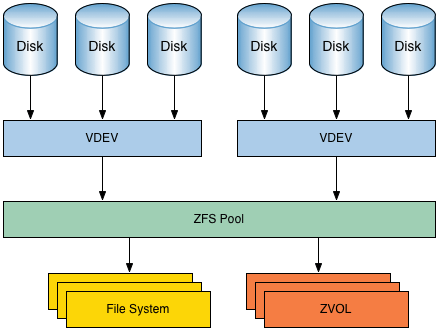
Fault tolerance lives at the VDEV level, not the pool level.

AlanHOST
But you're not very likely to run into that.
JoeHOST
Monty, who's a patron, wrote to us, Could you guys give an overview of backing up and restoring ZFS to and from an external hard disk? What I'd really like to do is clone an older laptop onto newer hardware.
JoeHOST
I'm not sure if ZFS is suited to that, though.
JoeHOST
Also, now at the end of 2026, what would be your recommended Linux and ZFS setup for not-so-technical people?
JimHOST
Backing up and restoring is easy with the beginner setup that you asked for, but unfortunately, cloning an entire set of hardware to something else, not so much.
JimHOST
So I'm gonna tackle that one first.
JimHOST
In order to clone one laptop to another, really what you need is for the original laptop to have been installed using ZFS boot menu.
JimHOST
This allows you to boot directly into ZFS and only have one single pool that has all your stuff on it.

BrentHOST
And maybe you don't need to necessarily have both.
WesHOST
Yeah, I mean, it basically copies, not copies, but has a very similar implementation of its Reed-Solomon sort of erasure coding stuff to ZFS or, you know, other modern file systems like that.
WesHOST
So you do get, you know, per block hashes, and it checks that before it reads it out and serves it over the API and that kind of thing.
WesHOST
So I think it is designed to store your files durably well.

BrentPANELIST
And maybe you don't need to necessarily have both.
WesHOST
Yeah, I mean, it basically copies, not copies, but has a very similar implementation of its Reed-Solomon sort of erasure coding stuff to ZFS or, you know, other modern file systems like that.
WesHOST
So you do get, you know, per block hashes, and it checks that before it reads it out and serves it over the API and that kind of thing.
WesHOST
So I think it is designed to store your files durably well.

Mike WiegerGUEST
So they're in the same rack, right? But they're two different physical machines and those back up to each other.
Mike WiegerGUEST
And then what makes it nice actually is If TrueNAS to TrueNAS backups are extremely easy, I have really started to love ZFS snapshots and replication.
Mike WiegerGUEST
So I send everything from Unraid to TrueNAS and then my TrueNAS syncs up with another TrueNAS box that I have in my in-laws farm.
Mike WiegerGUEST
a completely separate location.

denolfeHOST
Users shared experiences with data loss, debated backup strategies, and emphasized testing restores regularly.
denolfeHOST
Some discussed specific tools like ZFS, RASync, and cloud services, while others pointed out the risks of relying solely on cloud backups or sync solutions for data safety.
denolfeHOST
Overall, the consensus stressed that backup complexity is real and regular testing and diversified storage are key to effective data protection.
denolfeHOST
Title, Reversing Factorio's RNG.
Joe RessingtonHOST
I'm thinking a bit more higher end than that this time.
Jim SalterHOST
Well, I think everybody will be absolutely shocked when I, and I assume Alan, you know, one of our first sets of advice is we'll just use ZFS because, you know, then you can turn compression on and very likely save up to about 30% of your storage needs.
Allan JudeHOST
Yeah, the compression built into ZFS works very well and kind of hides the fact that there's any compression from the application, but it also does double duty.
Allan JudeHOST
Compressing the data will take less space on disk and that means you don't run out of space as fast.
Allan JudeHOST
But ZFS will also use that compressed version in its cache, meaning that the same amount of RAM can cache more data if that data is compressed.
Allan JudeHOST
And that can help you a lot there.
Allan JudeHOST
By default, ZFS uses LZ4 compression, but you can opt to one of the heavier compressors like ZStandard.
Allan JudeHOST
Basically, if LZ4 will give you 3x compression, then ZStandard will give you 4x.
JoeHOST
I'm thinking a bit more higher end than that this time.
JimHOST
Well, I think everybody will be absolutely shocked when I, and I assume Alan, you know, one of our first sets of advice is we'll just use ZFS because, you know, then you can turn compression on and very likely save up to about 30% of your storage needs.
AlanHOST
Yeah, the compression built into ZFS works very well and kind of hides the fact that there's any compression from the application, but it also does double duty.
AlanHOST
Compressing the data will take less space on disk and that means you don't run out of space as fast.
AlanHOST
But ZFS will also use that compressed version in its cache, meaning that the same amount of RAM can cache more data if that data is compressed.
AlanHOST
And that can help you a lot there.
AlanHOST
By default, ZFS uses LZ4 compression, but you can opt to one of the heavier compressors like ZStandard.
AlanHOST
Basically, if LZ4 will give you 3x compression, then ZStandard will give you 4x.
20 more episodes mention ZFS.
Create an account to see the whole feed, search across every transcript, and follow the entities you care about.