WPA3
45
MENTIONS
13
EPISODES
12
PODCASTS
Search complete. 45 mentions across 13 episodes found for "WPA3".
Oct 6, 2026

Keith ParsonsHOST
And so it ends up being the worst SSID for that reason, which kind of leads us to where we are today with 6 gig is this massive, huge, new spectrum we have to play with.
Keith ParsonsHOST
And yet it requires WPA3.
Keith ParsonsHOST
And how are people implementing that with Eduroam and making it be backward-forward compatible? It's a big question out there.
Mary BullGUEST
Yeah.
Mary BullGUEST
So 52, almost 53% are using WPA2.
Mary BullGUEST
So they're unable to use 6 gigahertz.
Mary BullGUEST
But the other half of the respondents are using either transition mode or WPA3.
Mary BullGUEST
I actually noticed recently that in the Eduroam connector agreement, so the worldwide agreement that sites sign, someone at your school signed it if you have Eduroam, It does actually call out WPA2, I think, with this idea of backwards compatibility.

Mary BullGUEST
Mm-hmm.
Keith ParsonsHOST
And yet it requires WPA3, and how do, how are people implementing that with Eduroam and making it be backward-forward compatible? That's, that's a big question out there.
Mary BullGUEST
Yeah.
Mary BullGUEST
So one of the things I've seen, when we asked in our survey, which the survey's still out there, um, I'd love more Eduroam admins to do it.
Mary BullGUEST
It's about half and half, actually.
Mary BullGUEST
So, so 52, almost 53% are using WPA2, so they're not, they're, they're unable to use 6 gigahertz.
Mary BullGUEST
Um, but the other half of the respondents are using either transition mode or WPA3.
Mary BullGUEST
Um, I actually noticed recently that in the Eduroam connector agreement, so the, the, like, worldwide agreement that sites sign, someone at your school signed it if [chuckles] you have Eduroam, um, it does actually call out WPA2, I think, with this idea of backwards compatibility.

Mary BullGUEST
Mm-hmm.
Keith ParsonsHOST
And yet it requires WPA3, and how do, how are people implementing that with Eduroam and making it be backward-forward compatible? That's, that's a big question out there.
Mary BullGUEST
Yeah.
Mary BullGUEST
So one of the things I've seen, when we asked in our survey, which the survey's still out there, um, I'd love more Eduroam admins to do it.
Mary BullGUEST
But of the 150 people who answered this survey, they said about, it's about half and half actually.
Mary BullGUEST
So, so 52, almost 53% are using WPA2, so they're not, they're, they're unable to use 6 gigahertz.
Mary BullGUEST
Um, but the other half of the respondents are using either transition mode or WPA3.
Mary BullGUEST
Um, I actually noticed recently that in the Eduroam connector agreement, so the, the, like, worldwide agreement that sites sign, someone at your school signed it if you have Eduroam [chuckles] Um, it does actually call out WPA2, I think, with this idea of backwards compatibility, and that's an opportunity, I think, with as the world continues to move forward, the-- there's a global Eduroam governance committee.

Cameron BirklandGUEST
Um, previous generations of Wi-Fi Pineapple could not do six gigahertz, but this thing can support Wi-Fi 6E.
Cameron BirklandGUEST
There's one downside, and the, all of the Wi-Fi Pineapples and actually any Wi-Fi pen testing tool nowadays has the same problem, is it can't touch WPA3 networks.
Eric BrownHOST
You mentioned Wi-Fi 6, right?
Cameron BirklandGUEST
Mm-hmm.
Eric BrownHOST
Which you're talking about true Wi-Fi 6 WPA3, but the Wi-Fi 7 standard is actually Wi-Fi 6.
Eric BrownHOST
Is it not?
Cameron BirklandGUEST
I know, so Wi-Fi 6 is still five gigahertz and Wi-Fi 6E is six gigahertz.
Cameron BirklandGUEST
That's what makes these, uh, so useful.

John BundyHOST
Um, but I'm gonna show another thing you can use it for, and that is to capture a password hash for WPA and WPA2.
John BundyHOST
Now WPA3 really improved on this, and so it's not as...
John BundyHOST
This isn't a method you'd use there.
John BundyHOST
But if you have a WPA or WPA2, most likely personal network, there's a hash of the password and some other information that gets exchanged over the air in a four, what's called a four-way handshake, and an attacker can try to capture that either when a client naturally connects to the network or by kicking that client off a network and watching it immediately reconnect, and that's what we'll try to do here.

Marylyn Lee TrotterHOST
Disabling UPnP forces you to manually approve any port forwarding, which is vastly more secure.
Eddie Montes TravisHOST
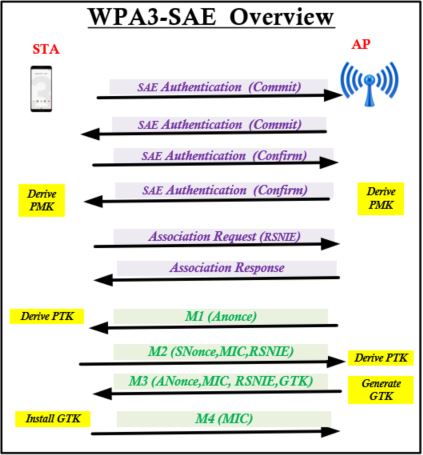
The last quick win is ensuring your router is broadcasting using WPA3 encryption for the Wi-Fi.
Eddie Montes TravisHOST
Older WPA2 standards had known vulnerabilities, like the KRACK attack, and were susceptible to offline dictionary attacks where someone could capture your Wi-Fi handshake and guess the password at their leisure.
Eddie Montes TravisHOST
WPA3 uses a much stronger simultaneous authentication process that essentially neuters those offline guessing attacks.
Marylyn Lee TrotterHOST
Those four steps: credentials, firmware, disabling UPnP, and WPA3 are the absolute minimum baseline.
Marylyn Lee TrotterHOST
But if we wanna talk about the pro move for twenty twenty-six, the strategy that actually creates a hardened perimeter, we have to talk about network segmentation using VLANs.
Eddie Montes TravisHOST
Virtual local area networks.

GabeHOST
I got one running all the way across my house.
JamieGUEST
I think I have that shitty security that we realize is no longer good and I need to switch over to WPA3 or whatever.
GabeHOST
Hmm.
GabeHOST
I don't know about that.

MaeHOST
Getting the Wi-Fi to work, I of course had trouble with as well, even with an Intel card.
MaeHOST
I think it's because my primary network is WPA3.
MaeHOST
Ah.
MaeHOST
In the installer, it asked me for the SSID.

MaeHOST
Getting the Wi-Fi to work, I of course had trouble with as well, even with an Intel card.
MaeHOST
I think it's because my primary network is WPA3.
MaeHOST
Ah.
MaeHOST
In the installer, it asked me for the SSID.

Herman PoppleberryHOST
And 802.11er, the fast handoff piece, is the one that's supposed to make this seamless.
Herman PoppleberryHOST
And it's broken in a lot of OpenWrt and WPA3 combinations.
Herman PoppleberryHOST
There's an open issue on the OpenWrt repository, number 9181, titled Broken 802.01nr, Roaming if 802.01nw is enabled, which covers WPA3 and WPA2 with 802.01nw. There's a forum thread where clients get locked out after a failed roam between a Banana Pi, BPI R4, and a GLMT6000.
Herman PoppleberryHOST
There's another where a user mapped the entire house to read DBM levels and still couldn't get roaming working across OpenVert and ZyxelGear.
Herman PoppleberryHOST
He mapped the house.
3 more episodes mention WPA3.
Create an account to see the whole feed, search across every transcript, and follow the entities you care about.