OpenCL
Programming languageWikipedia
15
MENTIONS
12
EPISODES
7
PODCASTS
Search complete. 15 mentions across 12 episodes found for "OpenCL".
Oct 25, 2026

Chris TitusHOST
I've had about three lockups, and I'm averaging about one a day, or actually I was averaging about two when I first started out, but after some updates, I'm in a pretty good area right now.
Chris TitusHOST
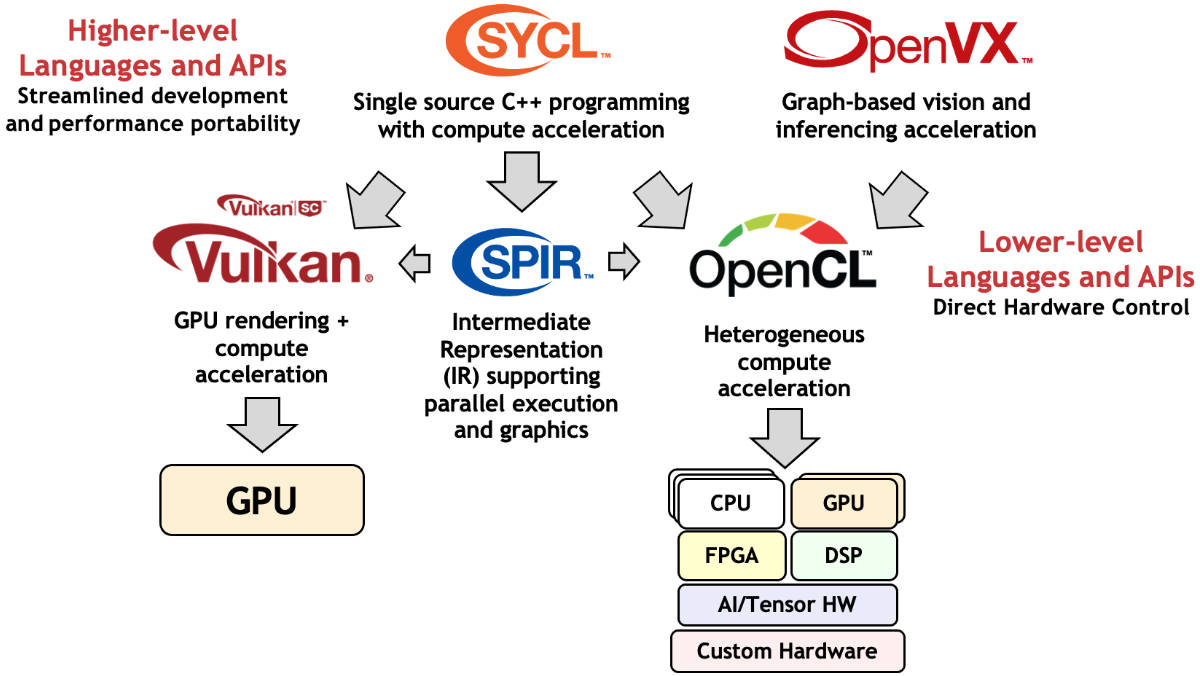
would highly recommend using like a time shift and also keeping backups of at least three kernels because you just never know when a bad update may come through because you're literally getting bleeding edge not necessarily testing or staging or development but um very very new stable releases so uh overall i'll kind of update this on my next one and touch into it and see how this is going if i'm still getting those freezes because it's been about a day i have about 24 hours of uptime right now on my machine without a freeze so you know hey it might freeze in this video but uh as of right now it's i'm in a really good spot so i'm really liking it as far as the updates is concerned So the last thing I wanted to go over is certain driver installations or assistance such as Vulkan, Mesa, OpenCL, all these things that help accelerate graphics or utilizing your GPO better in Linux.
Chris TitusHOST
uh because a lot of times your gpu just doesn't get utilized in many games i think a lot of linux users don't realize this so they try out uh one of the games and then they get in there and go oh well performance is crap it's done this is just horrible so out of the box the gaming performance wasn't great of course because heck nothing set up an arch out of the box for the most part um i got on warframe and i made a video which i'll link up uh up above here it was gaming and linux and i went over warframe when i first launched warframe without doing any modifications whatsoever it worked But it was very, very laggy.
Chris TitusHOST
So it was stutter.
Chris TitusHOST
And then also, um, GLS Lang for GLX.
Chris TitusHOST
Just checking out that information and what it was giving.
Chris TitusHOST
But on top of that, the other two I would mention is Mesa and Mesa Demos and OpenCL dash headers and OpenCL Mesa.
Chris TitusHOST
And then there's some other miscellaneous lib32 packages that I downloaded for specific games just to make them run a little bit better.
Chris TitusHOST
So if you're on here and look to make sure that it is actually pulling in all your platforms.
Chris TitusHOST
If it says platform zero, you're probably going to have some compatibility issues with OpenCL games, which a lot of these games that aren't officially supported will probably run through OpenCL.
Chris TitusHOST
so just a good tip here before we get in now we've i could go over steam which i'll go ahead and briefly touch on steam here um let me launch it i'll just go to my games here and launch steve native From here in my library, you can see all the just SteamOS Linux native games.
Chris TitusHOST
These games are officially supported in Linux.
7 MINS LATER
Chris TitusHOST
So, first check your Steam compatibility.
Chris TitusHOST
Native Steam, and if it can play directly from there using Proton, I have had no issues, and it is literally as simple as hitting Install and Play.
Chris TitusHOST
uh lutris is a little more involved as you've seen you just have to go in there you have to read those descriptions when you click install it's very important you read description first because there's some some games have some obscure things in their description that you got to make sure work properly and the third thing if you're going to really go off brand and get out of steam Make sure your OpenCL is working properly with CLinfo and GLXinfo as well if you're doing this, because a lot of times it does rely on OpenGL rendering or Vulkan, which will probably already be installed in some message drivers and things.
Chris TitusHOST
but honestly those should be installed anyways for gaming because you know you're getting reduced uh performance in a lot of ways from certain things so i know i need it for video editing like uh davinci resolve requires opencl um and you're just kind of i i just like having that functionality but i wanted to just make this video today just as just to say hey stop saying gaming sucks on linux because it doesn't and a lot of games work just fine completely as if you're playing it on windows and i just i don't get the comments i don't get it i mean yes there's a couple games that don't work Fallout 76, I still haven't got it working 100%.
Chris TitusHOST
So it's a little bit of a puzzling bug.
Chris TitusHOST
I think it's in relation to how I kind of hacked the open source Vega drivers to use the old school OpenCL from the closed source or proprietary drivers that AMD uses.
Chris TitusHOST
So I think my little... issue there may remain it's really kind of annoying me but I'm going to see how that goes and I'm only going to be releasing two more videos in this series one at 25 days or around there and then at the very conclusion i think we're getting to the end here uh you kind of have seen the progression of the switching from windows to linux i've given a lot of pros and cons in the earlier videos and kind of transitioned into just an update format because i'm not really booting into windows anymore so um i'm gonna do one more update video probably here uh mid next week and then at the end of uh next week i should be approaching 30 days and i will conclude this challenge with a overview of my thoughts and what i will be using
Chris TitusHOST
going forward Thanks for watching my video.
Chris TitusHOST
The libraries from your distro that you're using are probably more up to date than the stuff being used in rocky or rel based systems.
Chris TitusHOST
The other thing is setting up the GPU, which has OpenCL or CUDA if you're an NVIDIA user.
Chris TitusHOST
That's also a problem.
Chris TitusHOST
And then codec support is the next thing.
Chris TitusHOST
I can still game with plenty of my older games.
Chris TitusHOST
But this is how I install this.
Chris TitusHOST
So you have OpenCL and you get Resolve actually seeing that that GPU.
Chris TitusHOST
So that's the library launch problem.
Chris TitusHOST
CentOS version of the DaVinci Resolve installer to Debian.
Chris TitusHOST
I went ahead and installed that and then also used all open source drivers, the Mesa drivers, and did a backport of OpenCL functionality out of the AMD GPU drivers.
Chris TitusHOST
God, that's a mouthful now that I said it out loud, but... ah it works i got opencl it is working fantastic it's fast it's just awesome and uh wow i love it and other things uh you know no issues uh i can think of um overall my standby states everything is just working great you know knock on wood I keep switching back and forth between GIMP and Krita.
Chris TitusHOST
I do like Krita better than GIMP, and that hasn't changed at all.
Chris TitusHOST
I imagine I'll still use Kdenlive just because of how fast I've gotten in it.
Chris TitusHOST
But I wanted to use DaVinci Resolve and I couldn't because of a lot of driver issues and OpenCL issues I have.
Chris TitusHOST
Mind you, I am running a Vega 64, a very unique GPU, but it is a very modern GPU that works very well in Windows and also Ubuntu, where I can download the AMD GPU Drivers Pro and install it.
Chris TitusHOST
So before I switch distros after this month is over, so I want to show you guys the error I'm running into.

Michael TunnellHOST
But the really interesting work involves graphics and AI acceleration.
Michael TunnellHOST
Qualcomm is working with Mesa's graphics drivers, including Friderino for OpenGL, Turnip for Vulkan, and Rusticle for OpenCL Compute.
Michael TunnellHOST
They're also upstreaming fast RPC support to give Linux applications access to Hexagon NPU for local AI workloads.
Michael TunnellHOST
And they're working on power management, thermals, and system reliability.

Sandhya AnejaGUEST
And they identified that perfect hashing and the compact hashing.
Sandhya AnejaGUEST
So they implemented in OpenCL and we wrote this portable GPU implementation, the perfect hashing and the compact hashing implementation for the computational meshes in the different implementation including CUDA, HIP, Cocos, Raja, OpenACC, OpenMP, SQL, around eight implementations and we compare the perfect hashing with the compact hashing.
Sandhya AnejaGUEST
So this is the computational mesh and this is the refined mesh, adaptive mesh and this is the refined mesh and this is the sparse matrix corresponding to this fine mesh and then means this can be stored in the hash table and perfect hash table to space to save the space this can be stored into the compact hash table.
Sandhya AnejaGUEST
So, and this means for these computational structures, we need the, for computation, we need to look for the neighbors, top right-left neighbors.

JeffHOST
Right.
JeffHOST
I mean, there's always been OpenCL, but now we're starting to see Vulkan as a direct abstraction layer for AI processing.
JeffHOST
But we're also seeing a couple other basically universal execution layers that are able to run AI code on any hardware that you have.
JeffHOST
And so not only performance-wise, but you can also run the software on basically whatever you want.

Andy IhnatkoPANELIST
This is a, this is a treasure.
Leo LaporteHOST
Even, even Apple has recognized, I think, that after the OpenCL moment of January where they sold out all their Mac Minis, there's something happening here, and I think Apple has, has kind of said, "You know, that creator thing that we were doing?"
Andy IhnatkoPANELIST
[laughs]
Leo LaporteHOST
"There's this whole new group of people who are willing to spend absurd amounts of money on Mac hardware.
2 more episodes mention OpenCL.
Create an account to see the whole feed, search across every transcript, and follow the entities you care about.