nslookup
Unix-like operating system commandWikipedia
6
MENTIONS
3
EPISODES
3
PODCASTS
Search complete. 6 mentions across 3 episodes found for "nslookup".
Oct 15, 2026

speaker_1HOST
Yeah.
speaker_1HOST
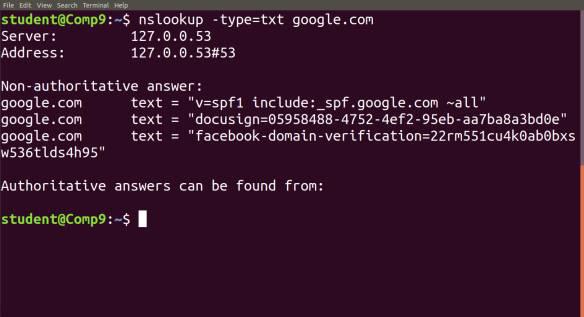
It's called NSlookup or name server lookup.
speaker_1HOST
Whether you are on Mac, Linux, or Windows, you literally just open a terminal, type NSlookup, followed by the target domain, and you are directly asking the domain name system to hand over its routing cards.
speaker_3HOST
So let's dive into those routing cards for a second, the DNS records.
speaker_3HOST
It's not just translating a name to a number.
speaker_3HOST
Yeah.
speaker_1HOST
It is a perfect example of why mapping these records is so critical, because misconfigurations in the map itself actually become the vulnerabilities.
speaker_3HOST
Okay, so NSlookup gives us the destination, but it doesn't really show us the journey.

James MesserHOST
In fact, it very much describes that process I spoke of in our rewind question, where you're asking a DNS server of a fully qualified domain name, such as portal.example.com. And that DNS server is going to provide you back with an IP address, in this case, 10.20.30.99. That is the nslookup command.
James MesserHOST
I guess this is not the output you would get from DIG, but if the operating system that you're running does have DIG, both of those work in very similar ways.
James MesserHOST
This one happens to be the NSLookup command, and the entire command line we used for this was NSLookupPortal.Example.com. We are doing a name server lookup of this fully qualified domain name.
James MesserHOST
And we're hoping to get an IP address back.
James MesserHOST
And in fact, we did get an IP address back.

James MesserHOST
So I will tell you that not only are you picking out five different answers for this performance-based question, but you are also maybe looking at a list of all of the potential answers for a lot of other things.
James MesserHOST
So all of the possible commands that are on here, this list, cd, dar, ipconfig, ping, netstat, nslookup, netuse, traceroute, pathping, checkdisk, et cetera, all of those come directly from the exam objectives.
James MesserHOST
So if you're looking through that list and you, I know what that one does, I know what that one does, I know what that one does, You run across a command that maybe you aren't quite sure what it does.
James MesserHOST
Make a note of that one because you need to know that for your exam.
8 MINS LATER
James MesserHOST
So we rely on DNS to perform that resolution behind the scenes.
James MesserHOST
It provides the IP address to your browser, and then your browser goes directly to my web server to be able to access the videos, the downloadable content, everything that you need to see on my website.
James MesserHOST
nslookup, great little utility that does not only this function but a lot more as well that might be a useful one to play around with.
James MesserHOST
And the last task on our list, obtain the newest domain group policy settings.